Keep posting on Facebook.
Send buyers to your own site.
Every listing gets its own page with your name and PRC licence. Put the link in your post, and every inquiry lands in one list instead of getting lost in Messenger.




Sound familiar?
If you've sold for a few years, you've lived these.
Works with how you already sell
No new app for your buyers. They still find you on Facebook. They just land somewhere better.
-
1
Add your listings
About two minutes each, from your phone. Your site opens with five sample listings so it never looks empty, and your first real one replaces them.
-
2
Post on Facebook like always
Tap Share, copy the ready caption, and paste the link as the first comment. Buyers tap through to the full listing.
-
3
Every inquiry in one list
You get an email, the buyer's details are saved, and you move them from New to Won with a tap.
A listing site with your name on it, live in minutes
Your name, logo, colour and PRC licence on every page. Buyers search your properties from the home page, and every one has its own page with photos, floor plan, payment terms, map and a contact form.


Pick your colour. Watch the site follow.
Tap a colour in the picture. In your Site Settings the same preview sits beside every field, so you see each change before you save. Nothing to design.
Every inquiry, saved and followed up
A buyer fills in your form, and they're in your list with their name, number and the property they asked about. Move them from New to Contacted to Viewing to Won with a tap, add notes, and set a reminder so the follow-up lands on your calendar.
See a real agent's site: Cebu Prime Estates
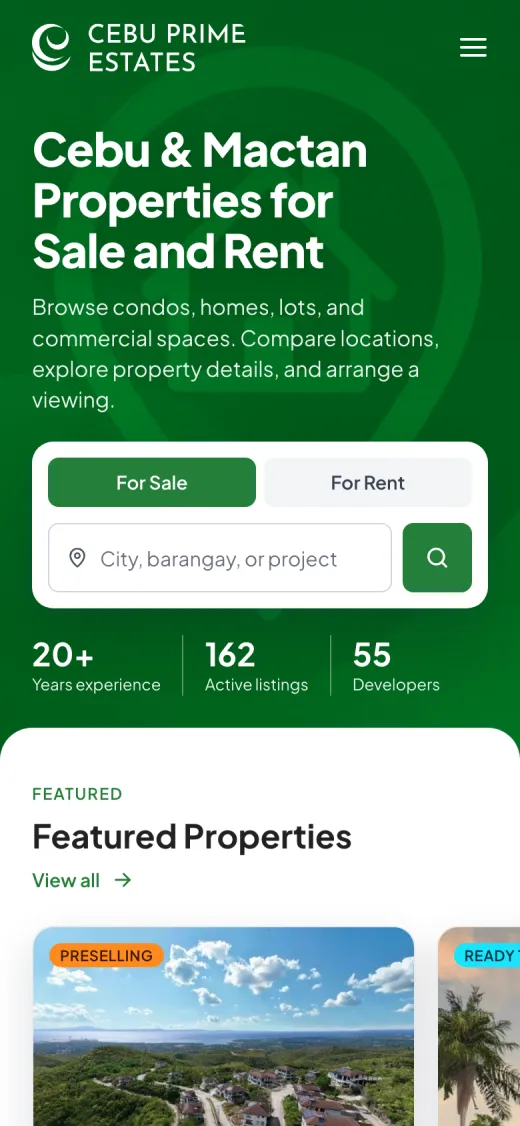
Maria Linda Sabaulan sells condos, homes and lots across Cebu and Mactan. Her whole catalogue lives on her own domain, in her colour, with her photo on the home page. Buyers search, open a property and message her, and every inquiry lands in her leads.
- Her own .com: cebuprimeestates.com Pro
- Every listing searchable by place, type and price
- A page per property with photos, unit models and payment terms
- Just as easy to use on a phone

Everything that comes with your site
Free gets all of it, except the three marked Pro.
Your website
What buyers see
- Your own web address
yourname.listingph.app, ready the moment you sign up.
- Your own .com Pro
Connect a domain you own, like yourname.com.
- Search, filters and a map of your areas
Buyers find the right property on their own.
- PRC and DHSUD on your pages
Your licence numbers where buyers can check them.
- Made for phones
Most buyers arrive from Facebook on a phone. Every page is built for that.
- Browse by type and developer
Condos, houses, lots, rentals, and each developer with its logo.
- About and Contact pages
Your story, photo, specialisations and service areas.
- Found on Google
Each property is set up for search engines, with a sitemap.
Your listings
What you post
- Photos, floor plans, videos and files
Price lists and walkthroughs on the listing, not in your Sent folder.
- Unit models and payment terms
Reservation fee, down payment and monthly, shown before they ask.
- Ribbons
Preselling, Ready to Move In, Price Drop, or your own in your own colour.
- Reserved and Sold
Mark it once. Buyers stop asking.
- Printable flyer with QR code Pro
A one-page flyer to hand out at viewings; the QR opens the listing.
- Location and nearby places
A map, plus schools, malls and hospitals with distances.
- Featured listings
Pick the ones that show first on your home page.
- Share on Facebook
A ready caption and first comment with the link, copied in one tap.
- Private notes
Owner contacts and reminders only you can see.
Your leads
Who gets in touch
- Email for every inquiry
Name, number, message and the property they asked about.
- Call and Viber buttons
Buyers reach you in one tap from any property page.
- Pipeline, notes and reminders
New to Won, with everything you've done with each buyer in one place.
- Spam filtered out
Bots and junk never reach your list.
- Analytics Pro
Views, top listings and where visitors come from.
- Calendar
Site viewings, follow-up calls and document deadlines in one view.
- Live preview
Change your colour, photo or bio and see your site update as you type.
- Sample listings to start
Your new site looks full on day one. Remove them in one click.
- Help when you need it
Send us a ticket from your dashboard and we reply there.
Start free. Upgrade when it's working.
Start on Free. When your site is bringing in inquiries and you've filled your 10 slots, Pro gives you unlimited listings and your own .com.
- Up to 10 properties on your siteSold ones don't count
- Your site at yourname
.listingph.app - Unlimited buyer inquiries in one list
- Same site design and every update
- Ready-to-post Facebook link and caption
- Payment terms on every property
When your site is working for you
or ₱7,990 a year, two months free
About ₱666 a month, two months free
Start free, then upgrade- Unlimited propertiesYour whole inventory on one site
- Your own .comLike yourname.com, connected for you
- No ListingPH logo on your site
- Printable flyers with a QR code
- AnalyticsViews, top listings and where buyers come from
Everyone starts on Free. Switch on Pro from your dashboard when you're ready. Paid through PayPal; cancel any time.
Questions agents ask before signing up

A real person reads every message.
Ask usIs the Free plan really free? For how long?
Yes, and it never expires. You get your own site at yourname.listingph.app, up to 10 listings on it, every inquiry saved, and the same site design as Pro. No credit card, no trial clock.
What happens when I reach 10 listings?
Nothing is deleted and your site stays live. Listings you mark Sold don't count towards the 10, so closing a deal frees a slot. If you want every property on your site, Pro has no limit.
Do I have to stop posting on Facebook?
No. Keep posting. Each listing has a Share button with a ready caption and the link to paste as the first comment, so buyers tap through to the full page.
Will buyers see that I'm licensed?
Yes. Your PRC licence number shows on your site, and your DHSUD number if you add one, next to your photo, experience and service areas. One link that shows you're the real thing.
How do I pay for Pro, and can I cancel?
Through PayPal only for now, with your PayPal balance or a debit or credit card, monthly or yearly. GCash is on our list. It renews on its own and you can cancel from your Billing page. You keep Pro until the date you paid for, then your account goes back to Free: nothing is deleted, and you choose which 10 listings stay on your site.
Can I use my own .com?
On Pro, yes. Buy the domain from any provider, point it at ListingPH with the two records shown in your settings (there's a Check My DNS button), and send the request. We connect it and your links keep working.
Who sees my buyers' details?
You do. Inquiries go to your email and your dashboard, and we never sell or share them. Spam and bots are filtered before they reach you, and everything is backed up every day.
Why not just pay someone to build me a website?
You can, and agents tell us quotes start around ₱50,000, then there's nobody to update it. ListingPH is free to start, you update it from your phone, and new features reach every agent without you doing anything.
Built in Cebu, with agents who sell for a living
I spent time with brokers here before writing any code, and what I saw was licensed professionals running millions of pesos in deals through Messenger threads. ListingPH is the system I'd want if I were one of them: your own site, your inquiries in one list, nothing to configure.
 Danica LouweFounder, Cebu City
More about me
Free users decide what comes next
ListingPH is early on purpose. The Free plan is how I learn what you add, what you skip, and what you ask support for. If something slows you down, tell me.
- You askOpen Support in your dashboard and choose Feature Request.
- Other agents agreeIf they ask for it too, it goes on the list.
- Everyone gets itIt ships to every site, Free and Pro.
Not signed up yet? Use the support form.
Your next buyer is already on Facebook.
Give them somewhere better to land.
Start free